 Neto Gregório
How to Create Studio Ghibli-Style Photos with ChatGPT
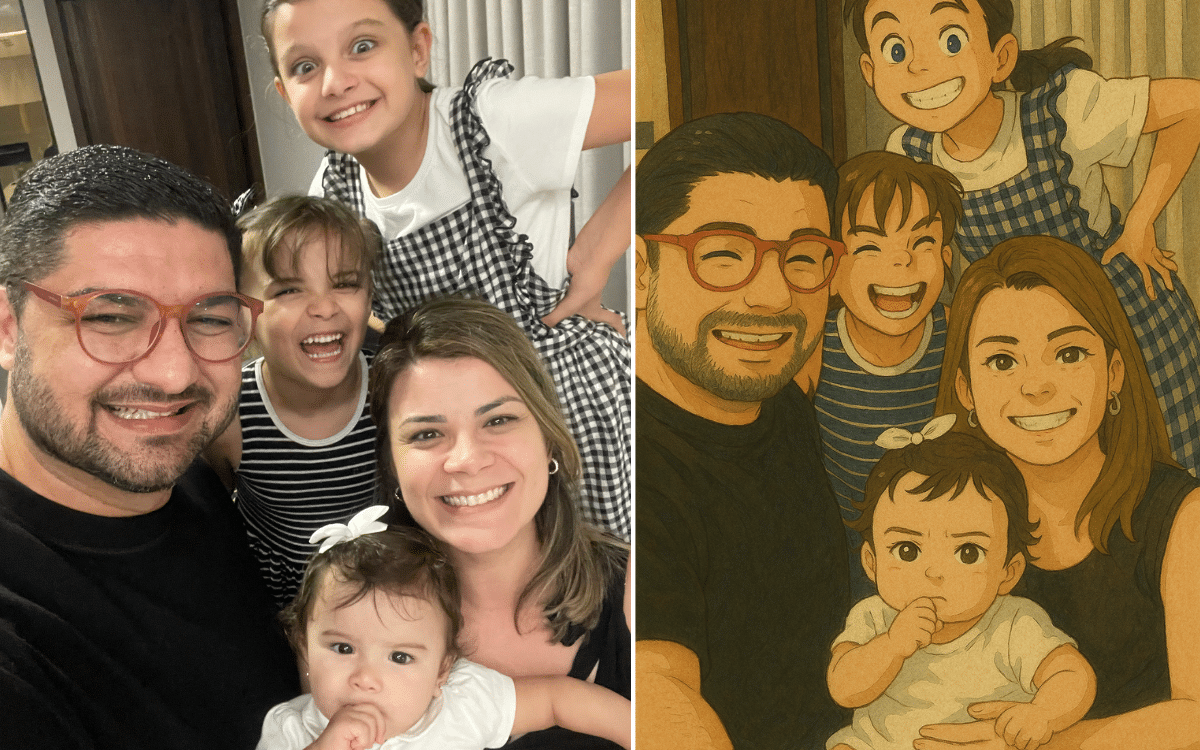
In recent days, the internet has been swept up in a new trend: creating images in the style of Studio Ghibli using artificial intelligence. This craze began with a ChatGPT update that now allows users to generate illustrations directly on the platform, using the GPT-4o model integrated with DALL-E.
In this tutorial, you will learn step by step how to create these magical and enchanting images, whether starting from a detailed description or adapting an existing photo.
What Is the Studio Ghibli Style?
Studio Ghibli, founded by Hayao Miyazaki, is known worldwide for its animations with unique brushstrokes and nostalgic atmospheres. Films like Spirited Away and My Neighbor Totoro have enchanted generations with lush landscapes, soft colors, and expressive characters. Creating images in this style means capturing the essence of magical, dreamlike worlds that blend simplicity with emotional depth.
How Does the Image Generation Feature in ChatGPT Work?
ChatGPT now integrates the DALL-E model to create images based on text or to transform photos uploaded by users.
Although there is no official "Studio Ghibli mode," it is possible to recreate the aesthetic of the Japanese studio with well-crafted prompts. The tool is available to subscribers of the Plus, Pro, and Team plans.
Step-by-Step Guide to Creating Studio Ghibli-Style Images
1\. Access ChatGPT
To get started, you need an OpenAI account with access to image generation. Make sure you are on a paid plan (Plus, Pro, or Team), as the feature is limited due to high demand.
2\. Choose Your Type of Creation
You can either create an image from scratch or transform an existing photo. Decide which approach you want to use before proceeding:
- Without an image: Ideal for creating imaginary scenes.
- With an image: Perfect for adapting personal photos or existing landscapes.
3\. Write a Detailed Prompt
The quality of the generated image depends directly on the precision of your prompt. Here are two examples:
Example 1: Prompt Without an Image
"Create an illustration of a small village surrounded by green mountains, with wooden houses and a sky lit by a golden sunset. Include flowering trees and a lake reflecting the sky. Do this in the style of Japanese animations from the 1980s and 1990s, with soft lines and vibrant colors."
Example 2: Prompt With an Image
"Using the uploaded photo, transform it into digital art inspired by classic Japanese animations. An artistic version similar to films produced by Studio Ghibli, but without directly copying it — just an inspiration. Add elements like flowering trees and soft lights in the background to create a magical atmosphere. Maintain the delicate lines and soft colors characteristic of this style."
4\. Refine the Results
After generating the image, review the result. If you are not satisfied, refine your prompt by adding more details or adjusting the visual elements:
- Add specific descriptions: "Include softer shadows and floral details."
- Request compositional adjustments: "Center the character more in the scene."
Tips for Better Results
- Be specific: The more detailed your prompt, the closer the result will be to the desired style.
- Avoid directly mentioning "Studio Ghibli": Some tools may restrict requests involving registered trademarks.
- Draw inspiration from the films: Use references like Princess Mononoke or Howl's Moving Castle to describe similar atmospheres.
- Test different combinations: Experiment with varying between natural landscapes, urban scenes, or portraits to explore the full versatility of AI.
Limitations of the Tool
Although ChatGPT is powerful, it may have some restrictions:
High demand can cause temporary instability in image generation. Results may vary depending on the complexity of the prompt. The tool does not yet officially support the Ghibli style; commands must be adapted.
Conclusion
Creating Studio Ghibli-style images with ChatGPT is an incredible way to explore your creativity and dive into magical worlds inspired by Japanese animations. With this tutorial, you have everything you need to start generating your own enchanting illustrations. Share your creations on social media and inspire others!
Whether you are a fan of Hayao Miyazaki's works or simply someone looking for new forms of artistic expression, this trend promises to bring a special touch to your visual ideas.
With these detailed instructions and practical examples, your readers will have all the tools they need to embark on this creative journey!